Overview
Kanban board for AI agents: the agent runs the board
A kanban board for AI agents: the agent creates the board, writes and moves cards, comments and logs time over MCP or the API, while board rules carry the rest.
Most boards are updated by hand: someone looks at what happened in the repo and drags a card. If a coding agent is doing the work, that step can go away. The same agent that writes the code can also read the board, create the cards, move them, comment on them and log the time, through the same API token it already has.
Setup for Claude Code, Cursor and Codex is on Zuuna for AI agents; how a git rule on the board moves a card after the merge is on the git integration page.
How we run Zuuna with it
Zuuna's own development runs this way. Coding agents, Claude Code among them, create the cards for their work over the API, comment what they did, and book their time on the card. They commit with the card key, and the rules on our board move the cards on from there.
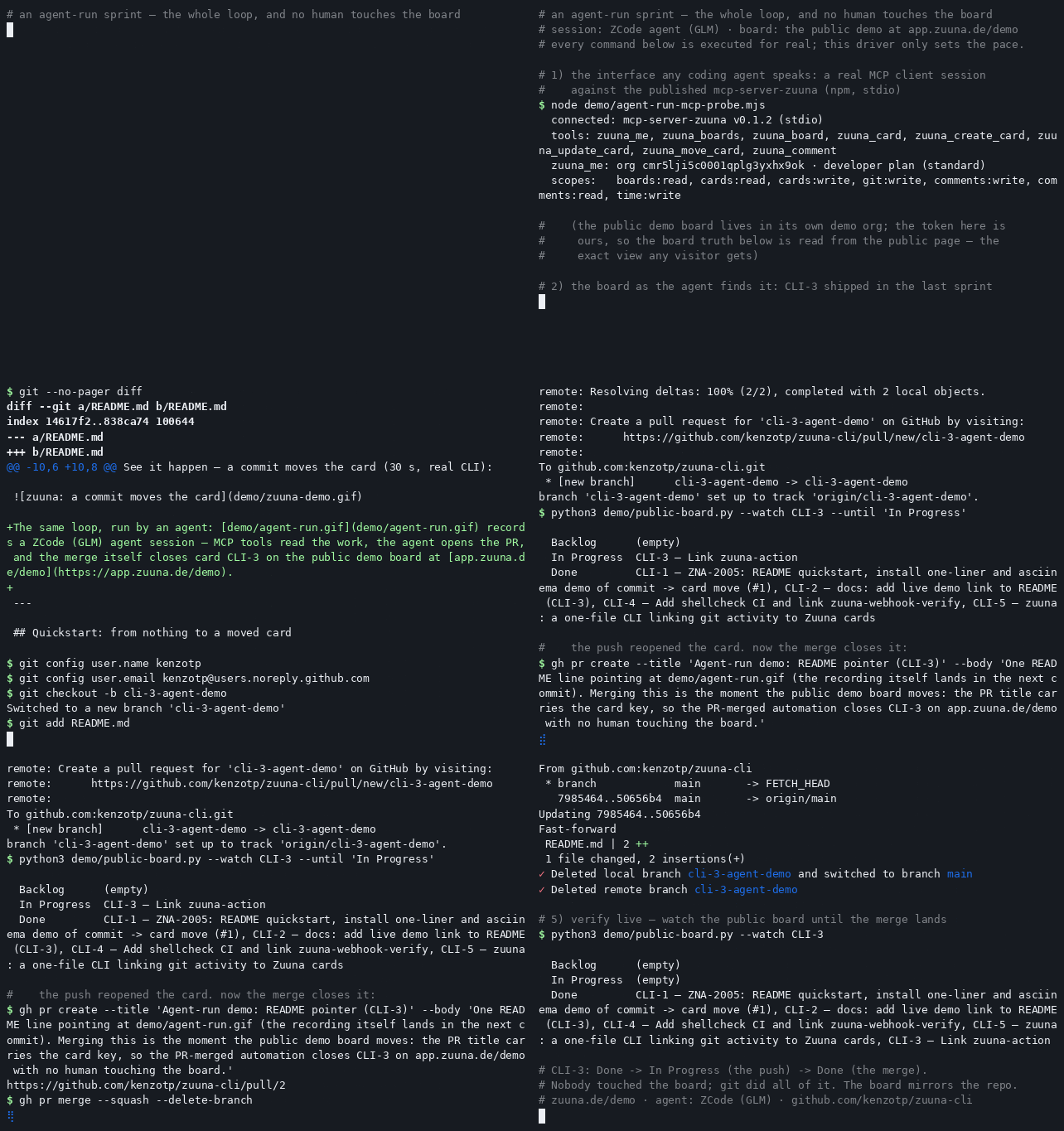
From empty board to done
A board that starts empty: one API call creates it, POST /api/v1/boards, with a title and the id of the group it belongs to. It comes back with no columns, so the next calls add them, one at a time: POST /api/v1/boards/{id}/columns, for "Next", "In progress", "Review" and "Done".
curl -X POST https://app.zuuna.de/api/v1/boards \
  -H "Authorization: Bearer zk_live_your_token" \
  -H "Content-Type: application/json" \
  -d '{"title": "App board", "groupId": "grp_1a2b3c"}'
From there, the agent can run most of a card's life over the MCP server alone. It creates the card with zuuna_create_card, giving it a title and a column ("Next"), plus an idempotency key so a retry after a dropped connection does not create it twice. Type, a due date, an estimate or story points go through the REST API instead, with PATCH /api/v1/cards/APP-12, since the MCP tool zuuna_update_card only covers title, description and priority. It moves the card between columns with zuuna_move_card, and comments on it with zuuna_comment once a piece of work is done. If the agent runs in a shell, the way Claude Code runs curl, it can also log the time it spent: POST /api/v1/cards/APP-12/time with {"duration": "1h 15m"}, or start and stop a live timer with {"action": "start"} and {"action": "stop"}. More on that on the time tracking page; if you bill for those hours, see project management with time tracking and invoicing.
The rules do the rest
None of this moves a card past the point where the agent leaves it, on its own. What carries it further are the automations you set up under the board's Automations settings: a trigger, then one or more actions, optionally narrowed by a condition such as the card's current column. A few make sense once an agent, or a connected repository, is generating events like these:
- Commit linked to a card, through the CLI hook or a connected repository, then move it to "In progress", with the option that only lets it move forward.
- Pull request merged, then move the card to "Done". This needs a connected GitHub, GitLab or Gitea repository.
- CI failed, then move the card back to "In progress" and add a comment; a rule can run more than one action.
- Card moved into "Review", then assign it to a person, or notify the assignees it already has.
- Time logged on a card that is still sitting in "Next", then move it to "In progress", since logged time means the work started.
The agent works under these rules and cannot change them. Only the REST API can read them, with GET /api/v1/boards/{id}/automations, which returns every rule with its last five runs, so the agent can tell you which one moved a card. The MCP server and the CLI have no access to rules at all, and no token, on any of the three, can create or edit one. A person adds a rule in the board's settings, in about a minute.
Three ways in: MCP, API, CLI
| Good for | Needs | |
|---|---|---|
| MCP server | Reading the board, creating and moving cards, commenting: the day to day loop, from inside Claude Code, Cursor or Codex | An MCP client and ZUUNA_API_TOKEN |
| REST API | Everything above, plus creating boards and columns, custom fields, checklists, relations, sprints, time tracking, reading comments, and reading automation rules | A shell the agent can use, like Claude Code running curl |
CLI (zuuna-cli) | Linking commits to cards automatically, cutting releases from git tags | Git and curl, a token, nothing else installed |
Claude Code adds the MCP server with one command:
claude mcp add zuuna \
  -e ZUUNA_API_TOKEN=zk_live_your_token \
  -- npx -y mcp-server-zuuna
For Cursor and Codex, the setup is on the agent page: Zuuna for AI agents.
Scopes keep the agent in bounds
An API token carries scopes, and the scopes decide what the agent can do, not the code it happens to run. There are twelve: boards:read, boards:write, cards:read, cards:write, comments:read, comments:write, time:read, time:write, git:write, releases:write, deployments:write and webhooks:manage. An agent that should only watch the board and report on it needs just boards:read and cards:read. One that runs the loop above, creating and moving cards and logging time, needs the matching write scopes and nothing more. A token with git:write or deployments:write reaches further than most agent setups need; hand those out per token, not by default.
What the board does not do for an agent
- No built-in AI plans or prioritizes the board. The agent that writes the code decides what to do next, not Zuuna.
- Setting labels or epics, running a full-text search, or moving a card to a different board are not possible over the API. Those stay manual, in the app.
- It does not deploy anything. Deploy gates and releases still run through your own pipeline.
MCP, API and CLI all need the Developer plan, the same one that unlocks the git integration. New workspaces get a 14-day trial of the plan they pick, no credit card, and every workspace runs on servers in Germany. Setting up the first token is covered in Create an API token and make your first call. Reference: REST API, CLI.
FAQ
Do I need a paid plan for an agent to use the board?
Everything an agent does through the API, and therefore through the MCP server and the CLI, needs the Developer plan. New workspaces get a 14-day trial of the plan they pick, no credit card.
Can the agent create or edit automation rules itself?
No, on purpose. Only the REST API can read the rules; the MCP server and the CLI have no access to them at all, and no token, anywhere, can create or edit one. The agent can read what exists over the API, explain which rule moved a card, and suggest a new one in plain words; a person adds it in the board's settings.
What stops the agent from doing more than it should?
The scopes on its API token. A token with only boards:read and cards:read can look but not touch; anything further needs the matching write scopes, and nothing forces you to hand out more than the loop needs.
Does the agent need the MCP server, or is curl enough?
Either works. The MCP server covers the day to day loop, reading the board, creating, moving and commenting on cards, from inside Claude Code, Cursor or Codex. An agent with a shell can call the REST API directly for anything beyond that, like creating a board, logging time or reading comments.
Does this work with agents other than Claude Code?
Yes. Anything that speaks the Model Context Protocol works with the MCP server; Claude Code, Cursor and Codex each have a documented setup on the agent setup page. An agent with a shell can also call the REST API directly, without MCP at all.