Overview
Zuuna for AI agents: agent builds, git rules move the card
Coding agents read your board over the Zuuna MCP server, work in your repo, and git rules on your board move the cards. Setup for Claude Code, Cursor and Codex, plus an honest list of what Zuuna does not do for agents.
Last updated:
Your coding agent works in your repo anyway. From now on it can see the board too: the Zuuna MCP server gives it cards, columns and comments, and Zuuna's git integration keeps the board pinned to reality rather than to the last manual update. The whole loop is four steps:
The loop in four steps
- The agent reads the board. Over the MCP server it sees the board as it is: columns in order, cards with keys like
ZNA-2001, priority, type. You name the card, or you let it pick. - The agent builds in the repo. Claude Code, Cursor or Codex write the code, with their own tools, in your repository. The card key goes into the commit.
- The pull request merges. Review runs as always, through your tools and your rules. Nothing about it is automated.
- Git links the card. Commits, PRs and releases land on the card without a single manual board update; releases and deploy gates flip when your git tag and your pipeline say so. The card moves to the next column only through an automation rule on your board, such as "pull request merged → Review". No rule is preinstalled; you add it once per board.
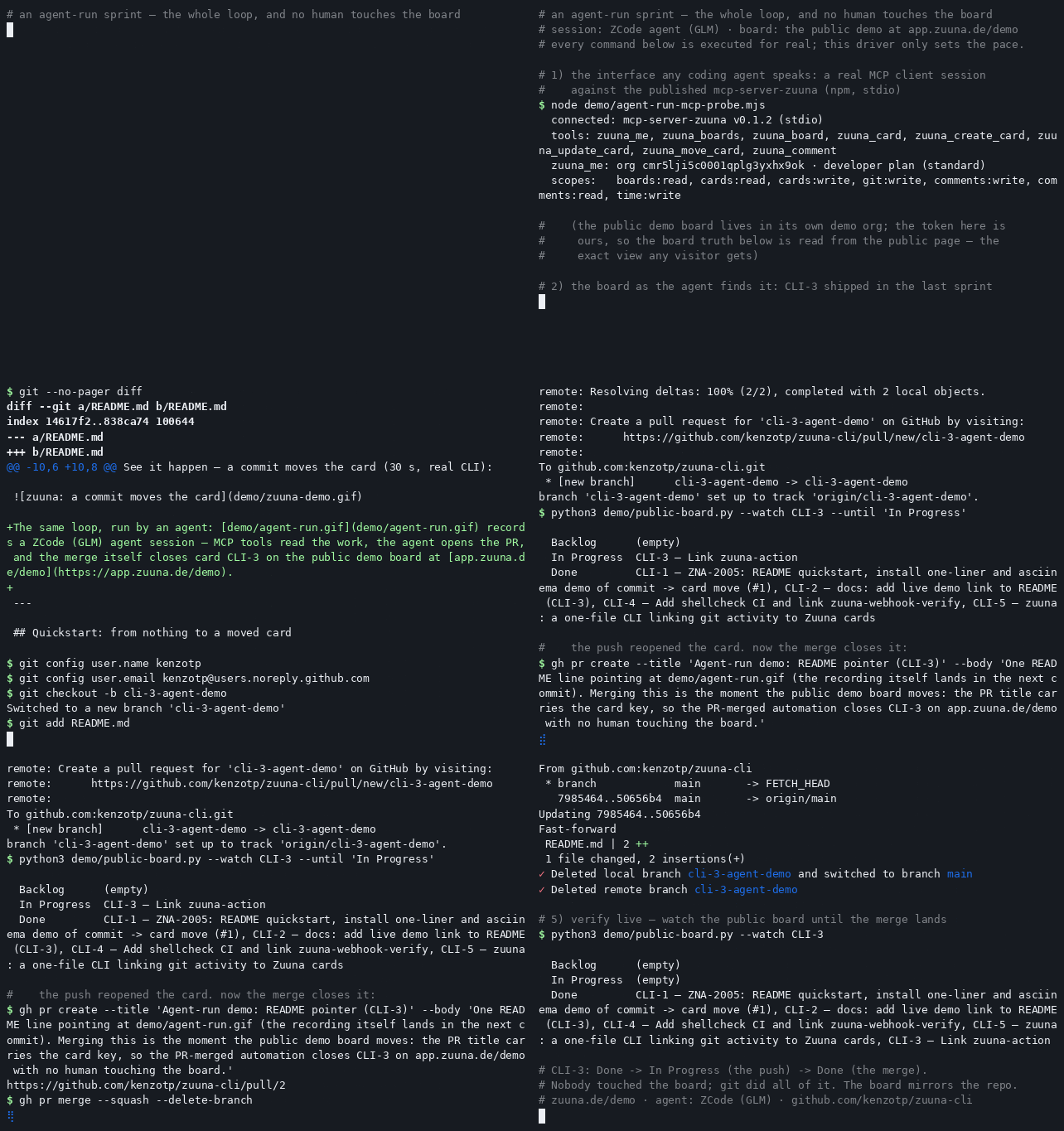
No more "did anyone move the card?" in standup. The board is not a reminder of what somebody should have entered. It is the record of what happened in the repo. How commits and cards get linked is covered in Link commits to cards automatically; how rules move cards on git events, in Move cards automatically with git.
The MCP tools: hosted or local
The simplest path is the hosted connector at app.zuuna.de/mcp: Claude, ChatGPT and any other MCP-capable client adds Zuuna directly by URL, with nothing to install. Sign-in runs over OAuth 2.1: you sign in once with your Zuuna account and pick the workspace and the scopes on the consent page. The connector is available on the Developer plan.
For a local process, such as a CI runner, an air-gapped agent, or a workflow that wants a plain bearer token instead of an OAuth sign-in, the same tool set is also an npm package: mcp-server-zuuna. Both paths speak the same Zuuna v1 API and are deliberately board I/O: no deploy tool, no git write access. The git and deployment tools only attach commits, CI checks and deploy status to the card: they push nothing and trigger no deploy.
73 tools across 15 categories:
| Category | Tools | Example |
|---|---|---|
| Identity | 1 | zuuna_me: token identity, organization, plan, scopes |
| Groups, members, epics | 6 | List groups and their members, create, edit and list epics, a group's cards |
| Boards, columns, automations | 7 | Create and list boards and columns, read a board's custom fields, read automation rules (read-only) |
| Cards | 12 | Search the whole workspace, create (up to 50 at once), edit, move, archive, delete, restore |
| Comments | 2 | Read and comment |
| Checklists | 4 | Read, add, edit and delete items |
| Relations | 3 | Link cards as blocked, dependent or a subtask |
| Attachments | 4 | Upload, list, read metadata, delete; no tool reads the file content |
| Time tracking | 8 | Log time, start and stop a timer, read and edit entries |
| Sprints | 6 | Create, assign and remove cards, edit |
| Recurring cards | 4 | Create, edit and delete rules |
| Releases | 5 | Create, edit, delete |
| Deployments | 2 | Report deploy status onto the card |
| Webhooks | 6 | Create endpoints, test them, view deliveries |
| Git | 3 | Report commits, CI checks and branches onto the card |
Two details that matter in practice: a hard WIP limit stays a hard WIP limit for agents too (the error comes back as a tool error carrying the API's own message), and 4xx answers are never silently retried.
How the agent runs the board itself, rather than only working cards off it, is covered in Kanban board for AI agents; how Claude Code keeps an app project on track across many sessions, in Claude Code project management.
Setup: Claude Code, Cursor, Codex
Two ingredients: an API token from your Zuuna workspace and the server itself. Give the token exactly the scopes the agent should have. A read-only observer needs only boards:read and cards:read; the full loop adds cards:write and comments:write. Creating the token is covered in Create an API token and make your first call.
As of today: the server is on npm as mcp-server-zuuna 0.3.0: publicly installable, tested (CI with ESLint, a TypeScript build and vitest), MIT-licensed. The package and its source repository are public. The normal path is a single npx line:
It is configured through environment variables: ZUUNA_API_TOKEN (required), ZUUNA_BASE_URL (defaults to https://app.zuuna.de) and optionally ZUUNA_TIMEOUT_MS (default 15000). Node.js 20 or later.
Claude Code:
claude mcp add zuuna \
  -e ZUUNA_API_TOKEN=zk_live_your_token \
  -- npx -y mcp-server-zuuna
Cursor (in ~/.cursor/mcp.json or the project's .cursor/mcp.json):
{
  "mcpServers": {
    "zuuna": {
      "command": "npx",
      "args": ["-y", "mcp-server-zuuna"],
      "env": { "ZUUNA_API_TOKEN": "zk_live_your_token" }
    }
  }
}
Codex (in ~/.codex/config.toml):
[mcp_servers.zuuna]
command = "npx"
args = ["-y", "mcp-server-zuuna"]
env = { "ZUUNA_API_TOKEN" = "zk_live_your_token" }
From source (alternative): If you would rather build than run npx, that works too:
git clone https://github.com/kenzotp/mcp-server-zuuna && cd mcp-server-zuuna && npm install && npm run build…and in all three configurations above, replace npx -y mcp-server-zuuna with node /path/to/mcp-server-zuuna/dist/index.js.
How this compares
Linear assigns agents as team members: the agent takes an issue and works the repository. The tracker then shows what the agent reported about its work. Zuuna turns that around: the board stores no status report, it reads the repository. A card moves when a commit lands, a pull request merges, a release tag exists or your pipeline reports back. The board cannot claim progress the repository does not show.
Atlassian's Rovo brings AI search, chat and agents to the Atlassian stack. The work item remains the record, updated by convention; Jira has no notion of a board whose state is derived from the repository. That is the gap a git-derived board closes: agent work needs no separate bookkeeping layer, because the merge is the moment of truth.
Honest scope: what Zuuna does not do for agents
- Zuuna does not write code. The agents build: Claude Code, Cursor, Codex. Zuuna provides the interface and the verifiable board truth. That is all.
- Zuuna does not decide anything. There is no built-in project-management AI that plans, prioritizes or closes work. The board mirrors the repo; agents and humans do the rest.
- Zuuna does not deploy. The MCP server is deliberately without deploy or git-write tools. Deploys run through your pipeline; the gates on the board flip only when your process says so.
See it yourself
We are happy to walk you through the loop on your own board instead of a recorded demo: get in touch. If you would rather read first: Project management for developers and Git on the board.
FAQ
Which AI agents can I connect?
Anything that speaks the Model Context Protocol: Claude Code, Cursor and Codex, each with a short configuration and your API token.
What keeps the agent within bounds?
The API token: its scopes decide what the agent may do, from read-only up to moving cards and commenting. Errors such as a hard WIP limit come back as tool errors carrying the API's own message, and they are never retried silently.
Do I still have to move cards by hand?
For work in the repo: no, once your board has an automation rule such as "pull request merged → Review". None is preinstalled. Without a rule, commits, pull requests, releases and deploy gates still attach to the card through the git integration, but moving it is up to you, or to your agent via zuuna_move_card. Anything that happens outside the repo, you maintain as usual.
How do I know what the agent actually did?
On the board: the git integration attaches commits and PRs to the card and releases to real git tags. The card shows evidence, not claims. In every case the source of truth is the repository.