Feature
The Code Graph: see what your team actually built
Releases as bands on a timeline, open branches, and every commit that shipped with no ticket: derived automatically from git and your pipeline.
Last updated:
GitHub knows the commits but not the tickets. Jira knows the tickets but not the commit range. The Code Graph closes exactly that gap, and shows a view no other tracker gives you.
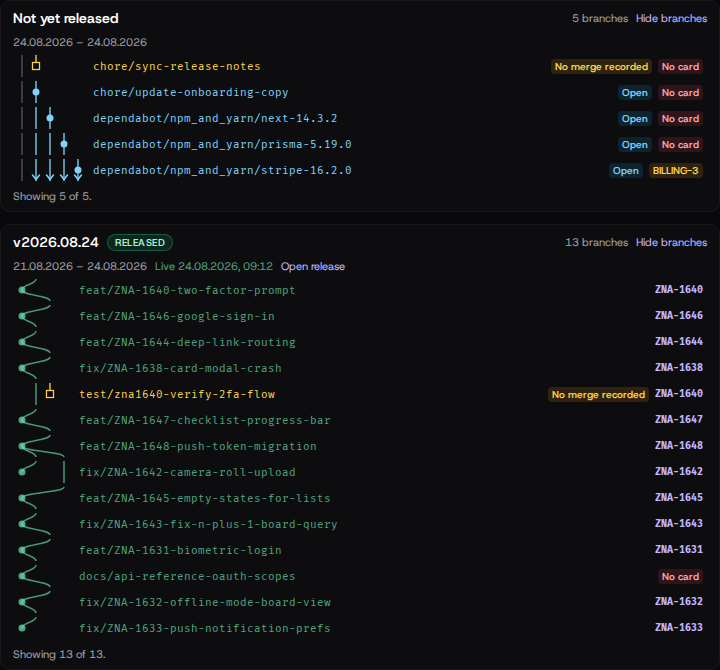
What you see
One page per group:
- Releases as bands on a timeline: the spine of your shipping.
- What’s open right now and what it branched off.
- Merged but not yet released: the work in the waiting room.
- Shipped with no ticket: every commit that reached production without naming a card.
It maintains itself
Nobody updates anything by hand. The graph derives itself from git and your pipeline: it’s always current because it’s built from the truth, not from status fields.
Who needs it
Team leads who want to know what’s really in a release before it ships. Developers who want to close the “what shipped untracked?” blind spot. Anyone who wants the board and the repository to finally agree.
Part of project management for developers. See also git on the board.
Where the data comes from
The graph is fed by what the CLI reports, and can be filled from your own tooling through the REST API. Changes in real time come over webhooks.
FAQ
What does the Code Graph show?
One page per group: every version as a band on a timeline, what's open right now and what it branched off, what's merged but not yet released, and every commit that reached production with no ticket.
Do I have to maintain the graph?
No. It derives itself from your git and your pipeline: nobody updates anything by hand.
Which plan is required?
The Code Graph is included in the Developer plan; it needs a connected repository and a pipeline.